Digital signage for the transportation industry has moved from a nice-to-have display upgrade to a core piece of operational infrastructure. Airports, rail networks, bus terminals, and transit authorities now rely on networked screens to communicate schedules, manage passenger flow, and respond to disruptions in real time. This guide covers what the technology does, why it matters operationally, and how transportation organizations can implement it well.
What Digital Signage Means in Transportation
In a transportation setting, digital signage refers to a network of connected displays, including LED and LCD screens, video walls, and interactive kiosks, that show live schedules, wayfinding information, safety messages, and promotional content from a central management system.
Unlike printed timetables or static boards, these systems pull directly from operational data feeds. When a gate changes, a platform shifts, or a service is delayed, the update appears on every connected screen at once, without a staff member walking a corridor to swap a paper sign.
Why This Matters for Transportation Organizations
The shift to digital signage in transportation is not primarily an aesthetic one. It addresses three operational pressures that transit authorities and airports face daily.
- Passenger uncertainty during delays and disruptions, which drives complaints and strain on staff
- Rising foot traffic volumes that make manual wayfinding and paper signage difficult to maintain
- Growing pressure to generate non-fare revenue from existing infrastructure
Screens that update automatically from live data address the first two directly. The third is addressed by turning existing screen inventory into an advertising asset during off-peak content windows.
Business and Operational Impact
Digital signage for transportation industry deployments typically affects four operational areas.
Passenger Experience
Live departure and arrival boards, often called Flight Information Display Systems in aviation, reduce uncertainty by showing real-time gate changes, delays, and cancellations. Reduced uncertainty has a measurable effect on perceived wait time, even when actual wait time does not change.
Staff Efficiency
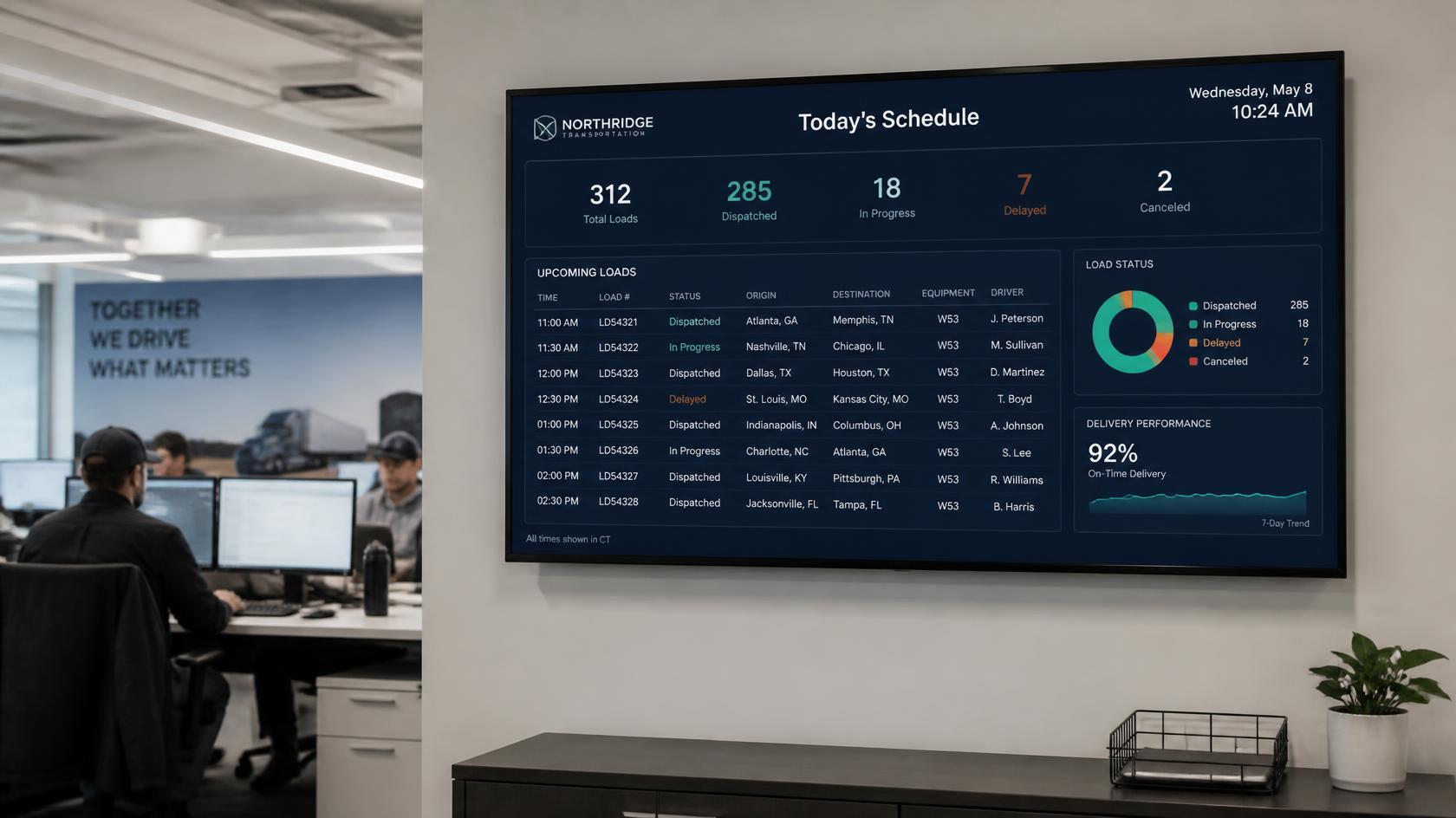
When queue lengths, security wait times, and service status are visible on screen, frontline staff spend less time answering the same repeated questions. Operational dashboards aimed at staff, rather than passengers, are a common but underused application of the same signage network.
Safety and Emergency Response
A signage network built for real-time updates can push evacuation instructions or safety alerts to every screen within seconds. Some deployments segment messaging by zone, so a message for one terminal or platform does not appear where it is not relevant.
Revenue Generation
High-attention environments like transit hubs and airports make screen inventory valuable for advertising. Time and location-based promotion, such as breakfast offers during the morning commute or retail promotions near departure gates, is a common monetization layer built on top of the same infrastructure used for operational messaging.
Implementation Steps
Organizations moving from static signage to a networked digital system generally follow a similar sequence.
- Audit existing information points: printed boards, manual announcement systems, and any legacy digital displays already in place
- Identify the operational data sources that need to feed the system, such as scheduling systems, dispatch software, or flight data providers
- Select a content management platform that supports centralized control across every screen and location
- Plan screen placement around passenger flow: entry points, decision points such as concourse junctions, and waiting areas
- Build a content governance process covering who can push updates, approval steps for emergency messaging, and advertising content review
- Pilot in one terminal, station, or route before expanding network-wide
A cloud-based, centrally managed platform matters most at this stage. Managing screens location by location does not scale once a network passes a few dozen displays across multiple sites. Platforms with secure cloud-based architecture and centralized screen management let a single operations team monitor and update an entire network, including systems spanning multiple terminals or a full transit line, from one dashboard.
Industry Use Cases
Airports
Flight Information Display Systems are the most visible example of transportation digital signage. Gate and boarding time updates propagate automatically, reducing missed flights tied to information gaps rather than passenger error.
Rail and Metro
Platform change alerts and service disruption notices help passengers reroute in real time, which improves both actual and perceived punctuality.
Bus Terminals
Live arrival boards reduce crowding at information counters and help passengers plan connections without approaching staff directly.
Highway and Transit Corridors
Roadside and corridor signage communicates traffic conditions, weather, and safety messages to drivers and commuters outside of fixed stations.
Common Challenges
Transportation signage deployments run into a consistent set of obstacles.
- Uptime requirements: screens in a transit environment need to run continuously, and downtime during peak hours creates confusion rather than just inconvenience
- Data integration: signage is only as accurate as the operational systems feeding it, which means API and database connections need to be reliable, not just present
- Content management at scale: a network of hundreds of screens across multiple sites needs centralized scheduling and remote troubleshooting, not manual, screen-by-screen updates
- Accessibility: information has to remain legible and, where relevant, multilingual for a passenger base that varies widely in language and ability
Best Practices
- Treat the signage network as operational infrastructure, not a marketing add-on, when setting uptime and support expectations
- Connect signage directly to live operational data sources rather than relying on manual entry, which introduces delay and error
- Use real-time dashboards to monitor screen health across every location, so a failed display is caught before a passenger notices it
- Separate operational content (schedules, alerts) from promotional content in the scheduling system, with operational messaging always taking priority
- Plan for multi-location scalability from the start, even in a single-terminal pilot, so the platform does not need to be replaced during expansion
Mistakes to Avoid
- Choosing a signage platform based on hardware alone, without evaluating integration options and the strength of the content management layer
- Rolling out a full network before piloting in one location and confirming data integration is reliable
- Underestimating the number of integrations needed, since transportation environments typically pull from scheduling, dispatch, weather, and emergency systems at once
- Leaving emergency messaging as a manual, multi-step process instead of building a fast, tested escalation path into the platform
Where Transportation Signage Is Heading
A few directions are shaping the next phase of transportation signage deployments.
- Personalization tied to destination or mobile app data, rather than one-size-fits-all messaging
- Deeper interactivity through larger touch surfaces and voice-enabled kiosks
- Predictive content that adjusts based on congestion, dwell time, and delay patterns rather than reacting after the fact
- Consistent messaging unified across signage, apps, SMS, and web, so passengers get the same information regardless of channel
Frequently Asked Questions
What is the difference between digital signage and a Flight Information Display System?
A Flight Information Display System, or FIDS, is a specific application of digital signage focused on aviation schedules. Digital signage is the broader category that also covers wayfinding, safety alerts, staff dashboards, and advertising across any transportation setting.
How many integrations does a transportation signage platform typically need?
It varies by site, but most deployments connect to scheduling or dispatch systems, weather data, emergency alert systems, and sometimes retail or advertising platforms. A platform supporting 100+ integrations gives transportation operators room to add data sources without switching systems later.
Can one platform manage screens across multiple terminals or stations?
Yes, provided the platform is built for centralized, cloud-based management. This is the main requirement that separates enterprise-grade transportation signage from smaller retail or corporate deployments.
How is digital signage in transportation monetized?
Screen inventory used for operational messaging can also carry advertising during appropriate content windows. Time and location-based promotions, such as retail offers near a specific gate or platform, are the most common approach.
What is the biggest risk in a transportation signage rollout?
Unreliable data integration. A signage network that looks correct on day one but drifts out of sync with live operational systems creates more passenger confusion than no digital signage at all.
Get Started
Transportation organizations evaluating a move to networked digital signage should start with a platform built for enterprise-grade reliability and multi-location scale. If you are planning a signage rollout across an airport, rail network, or transit system, book a demo with RocketScreens to see how centralized screen management and real-time dashboards fit your operational requirements.