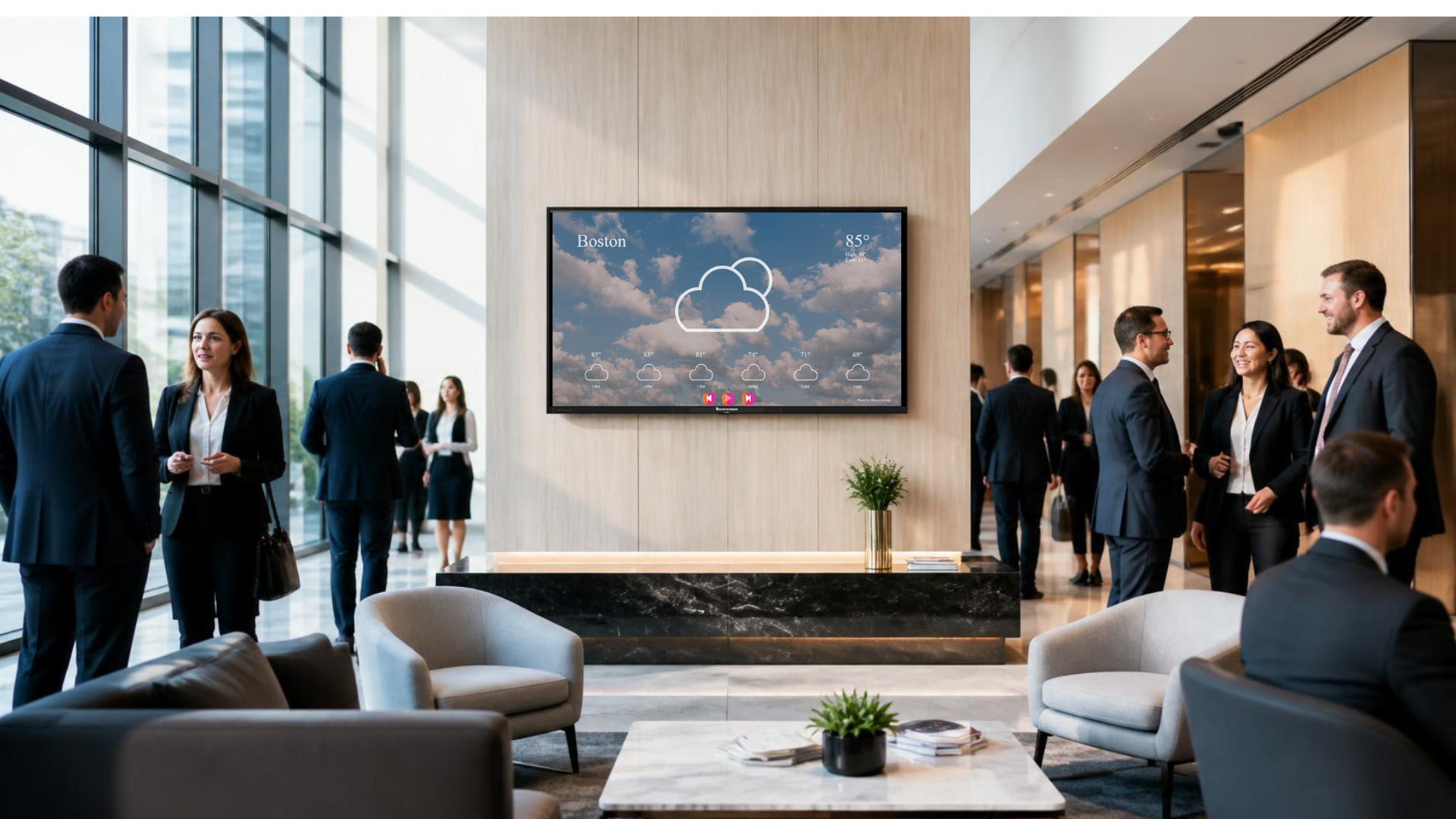
Hourly weather updates are one of the most underrated pieces of content an organization can put on its internal screens. Weather influences commute times, shift handovers, delivery schedules, outdoor work, energy use and site safety, yet most workplaces leave employees to check it individually on their phones. Displaying live conditions across lobbies, floors, break rooms and operations areas turns a private habit into shared awareness, and shared awareness is what keeps a site running on days when conditions shift quickly.
This guide explains what workplace weather displays include, the operational value they create, how to roll them out across multiple locations, and the mistakes that make them decorative instead of useful.
What Hourly Weather Updates on Workplace Screens Actually Include
A weather widget on a screen is not just a temperature reading. A well configured display carries the details people act on during the working day.
- Current conditions and feels-like temperature for the site location
- An hourly forecast covering the next six to twelve hours
- Precipitation probability and expected intensity
- Wind speed and gusts, which matter for cranes, lifts, loading bays and rooftop work
- Visibility, humidity and UV index where relevant to the site
- Sunrise and sunset times for shift and lighting planning
- Severe weather alerts issued by the local meteorological authority
- Multi-city panels for organizations with distributed teams or travelling staff
The value comes from the hourly view rather than the daily summary. A daily forecast tells someone it may rain. An hourly forecast tells a warehouse supervisor that the rain arrives at 3 PM and that outbound loading should be pulled forward.
Why Hourly Weather Updates Matter for Modern Organizations
Workplaces have become more distributed, more shift-based and more dependent on tight logistics. Each of those trends increases weather sensitivity.
Employees on hybrid schedules make travel decisions in the middle of the day. Field teams plan site visits between meetings. Facilities staff adjust HVAC loads based on conditions. Manufacturing and construction sites make continuous calls about outdoor tasks. In each case, the decision quality depends on how current the information is and how many people saw it.
Screens solve the distribution problem. Information on a screen reaches everyone in the space at once, including contractors, visitors and employees who do not check email during their shift. That is the same reason organizations already put safety metrics, production dashboards and internal announcements on office displays. Weather belongs in the same category because it changes plans.
The Operational and Business Impact
Fewer disruptions to shift changes and travel
Storms, heavy rain and heat advisories affect attendance and punctuality. When conditions are visible on screens through the day, managers can stagger departures, approve early exits, arrange transport support or shift a meeting online before the disruption arrives rather than after. Absence and late arrival patterns during severe weather usually improve once the forecast is public inside the building.
Safer sites and faster response
Wind, lightning, extreme heat and poor visibility carry direct safety implications for warehouses, plants, logistics yards, campuses and construction sites. Displaying thresholds alongside the forecast, for example the wind speed at which lifting operations stop, connects the data to the rule. Severe weather alerts on screens also work as a secondary notification channel when phones are stored away or PPE limits phone use.
Better facility and energy decisions
Facilities teams use hourly temperature and humidity trends to pre-cool spaces, adjust ventilation, plan cleaning schedules around rain and time outdoor maintenance. Displaying the same data in operations areas keeps those decisions transparent, which reduces the number of individual complaints and requests that reach the facilities desk.
Stronger internal communication habits
Weather is content people voluntarily look at. Placing it alongside company announcements, safety reminders, production numbers or event schedules increases the attention those messages receive. It gives screens a daily reason to be watched instead of ignored, which is the difference between a signage network that earns its budget and one that becomes wallpaper.
How to Roll Out Hourly Weather Updates Across Your Workplace
Implementation is straightforward when it is treated as an internal communication project rather than a hardware exercise.
- Map your locations and confirm the exact coordinates or postal codes for each site so forecasts reflect local conditions rather than a regional average.
- Decide what each audience needs. A corporate lobby may need current conditions and a three-city panel. A dispatch area needs hourly precipitation, wind and alerts.
- Choose a data source with reliable coverage in your regions and an update frequency that matches your operations.
- Design the layout so weather occupies a consistent zone on the screen, usually a sidebar or lower band, while the primary zone carries rotating operational content.
- Set alert rules that promote severe weather notifications to full screen or to a high-contrast banner when thresholds are crossed.
- Group screens by site or region in your content management platform so weather content is assigned once and inherited by every display in that group.
- Publish, monitor and review. Check that each location is pulling the correct feed and that alerts trigger as intended during the first weather event.
Platforms such as RocketScreens support this pattern through centralized screen management, cloud-based deployment and location-level grouping, so a single content rule can apply consistently across dozens or hundreds of displays without local configuration at each site.
Industry Use Cases
Manufacturing and warehousing
Yard operations, outbound dispatch and rooftop maintenance all depend on short-range forecasts. Screens near loading docks and shift boards carry hourly precipitation and wind so supervisors can resequence work.
Construction and infrastructure
Site offices display wind gusts, lightning proximity and heat index alongside stop-work thresholds. Weather visibility supports toolbox talks and reduces disputes about why an activity was paused.
Corporate offices and campuses
Lobby and floor screens combine local conditions with transport advisories, helping hybrid teams decide travel timings and helping reception manage visitor expectations.
Healthcare
Staff areas and ambulance bays benefit from severe weather alerts that affect patient transport, parking access and staffing continuity across shift changes.
Education
Campus displays communicate conditions that affect outdoor sessions, sports fixtures, transport and event schedules to students and staff simultaneously.
Retail and hospitality
Back-of-house screens use hourly forecasts for staffing and stock decisions, since footfall, outdoor seating and delivery volumes shift with conditions.
Common Challenges
Most difficulties come from configuration rather than technology.
- Location accuracy. Sites on the edge of a metro area often receive forecasts from a station many kilometres away, which reduces trust in the data.
- Unit and format mismatch. Mixed use of Celsius and Fahrenheit or twelve and twenty-four hour clocks across regions causes confusion in multinational deployments.
- Screen clutter. Adding weather without reworking the layout squeezes existing content and hurts readability from distance.
- Alert fatigue. Notifications set at low thresholds train people to ignore the screen.
- Network dependency. Displays on restricted networks may fail to reach the weather API if the domain is not allowed by IT.
- Ownership gaps. Weather content often has no assigned owner, so nothing gets reviewed after launch.
Best Practices
- Match the forecast horizon to the decision. Six to twelve hours suits operational sites. Multi-day views suit corporate lobbies and travel-heavy teams.
- Keep weather in a fixed zone so viewers know where to look without scanning.
- Use large type and high contrast so conditions are legible from typical viewing distance in the space.
- Pair weather with the action it should trigger, for example a wind threshold next to a lifting rule or a rain alert next to a dispatch reminder.
- Localize by site rather than by company. A single national forecast is not useful to any individual location.
- Escalate only genuine severe weather to full-screen alerts so the format keeps its urgency.
- Review after each significant weather event to confirm the alert fired correctly and reached the right screens.
- Combine weather with the operational dashboards, calendars and ticket queues already displayed, so screens serve one integrated view of the working day.
Mistakes to Avoid
- Treating weather as decoration. Without thresholds and context it becomes background noise.
- Using a single default location for all sites in a multi-location rollout.
- Refreshing too slowly. A forecast that updates once a day defeats the purpose of an hourly view.
- Overloading the screen with humidity, dew point, pressure and pollen when only three or four fields drive decisions.
- Ignoring accessibility. Colour-only indicators for severe conditions exclude viewers with colour vision deficiency, so pair colour with text and icons.
- Leaving screens unmonitored, so a failed feed shows stale data for weeks before anyone reports it.
- Skipping IT review of network and security requirements before deployment across sites.
Measuring the Value
Weather content is easier to justify when it is tied to measurable outcomes. Useful indicators include late arrivals and absences during severe weather periods compared with previous seasons, the number of weather-related stop-work incidents recorded correctly, delivery and dispatch reschedules completed before conditions changed rather than after, facilities tickets related to temperature comfort, and screen uptime across sites. None of these require a new measurement system. They come from records most operations and HR teams already maintain.
Frequently Asked Questions
How often should hourly weather updates refresh on workplace screens?
A refresh interval of ten to fifteen minutes is sufficient for most workplaces, with severe weather alerts pushed immediately when issued. Operations with high weather sensitivity, such as construction or airside logistics, may want shorter intervals for wind and lightning data.
Will weather content take attention away from company messaging?
The opposite usually happens. Weather gives employees a routine reason to look at the screen, which increases exposure to the announcements, metrics and safety reminders displayed alongside it. Keep weather in a supporting zone and the primary zone for company content.
Can different offices show different weather on the same signage network?
Yes. Screens are grouped by site or region and each group is assigned its own location feed, so every display shows conditions for the building it is in while the content template stays consistent across the organization.
Do weather displays require additional hardware?
No. Weather is a content layer delivered through your existing media players and screens. If the displays already run internal communications or dashboards, adding a weather zone is a configuration change rather than a hardware purchase.
How do we handle severe weather alerts without causing panic?
Use tiered visuals. Advisory conditions stay in the standard zone, warnings move to a banner, and only immediate threat alerts take the full screen. Pair each alert with the specific action expected, such as securing outdoor equipment or moving to a designated shelter area.
Put Live Weather on Every Screen You Manage
Hourly weather updates work best when they are part of a wider display strategy rather than a standalone widget.
RocketScreens gives operations, facilities and internal communication teams centralized screen management, real-time dashboards, over 100 integrations and multi-location scalability on secure cloud-based architecture, so weather, safety messaging and business data appear together on every screen from one place.
Book a demo to see how weather, alerts and operational dashboards can be deployed across your locations, or speak with our team about a rollout plan for your sites.