Microsoft Teams for sales has become the default collaboration layer for revenue organizations. Reps chat about deals, managers run pipeline reviews on video calls, and leadership posts announcements in dedicated channels. Yet many sales teams that live inside Teams all day still miss targets, miss follow-ups, and miss important updates. The tool is not the problem. Visibility is. This guide explains how sales departments actually use Microsoft Teams, where alignment breaks down, and how broadcasting live Teams updates and dashboards on office TVs closes the gap.
Why Sales Teams Drift Out of Alignment
Modern sales teams operate across a CRM, an email client, a dialer, a BI tool, and a collaboration platform. Every one of those systems holds a piece of the truth about pipeline health, quota progress, and daily priorities.
The result is fragmentation. A rep may not know that a strategic account went cold. A manager may not notice a dip in outbound activity until the weekly review. Leadership announcements sit unread in a channel while reps are heads-down on calls.
Alignment fails not because information is missing, but because it is scattered and hidden behind tabs, logins, and notifications that are easy to ignore. Since Microsoft Teams already sits at the center of daily communication for most sales departments, it is the natural home base for fixing this.
What Microsoft Teams for Sales Actually Does
Microsoft Teams is a collaboration platform that combines chat, video meetings, channels, file sharing, and app integrations in a single workspace. For a sales department, that translates into a few core capabilities:
- Structured channels: Teams and channels organized by territory, vertical, product line, or strategic account, so conversations and documents stay in context.
- Meetings and pipeline reviews: Video calls with screen sharing, recording, and transcription for forecast calls, deal reviews, and coaching sessions.
- CRM integration: Connections with Dynamics 365 Sales and other CRM tools that surface records, opportunity updates, and account notes directly inside Teams.
- Copilot and AI assistance: Meeting summaries, call insights, and suggested action items that reduce manual note-taking after customer conversations.
- App tabs: Power BI reports, SharePoint pages, Planner boards, and spreadsheets pinned inside channels for quick reference.
Used well, Microsoft Teams becomes the connective tissue between the CRM, the analytics layer, and the humans doing the selling.
Typical Sales Use Cases Inside Microsoft Teams
Most sales departments converge on a similar set of patterns once Teams adoption matures:
- Deal rooms: A dedicated channel for each strategic opportunity where account executives, solution engineers, and leadership share notes, proposals, pricing discussions, and meeting recordings.
- Pipeline reviews: Recurring meetings where managers open CRM dashboards, walk through opportunity stages, and update forecasts together on screen.
- Announcements and recognition: Channels for closed-won posts, quota milestones, new logo wins, and leadership updates that keep morale and momentum visible.
- Competitor and market intelligence: Shared threads where reps post competitor movements, pricing changes, and industry news that affects active deals.
- Cross-functional collaboration: Shared spaces where sales works with marketing on campaigns, with product on roadmap questions, and with customer success on handoffs and renewals.
Each of these use cases improves collaboration. None of them, on their own, solves the visibility problem.
The Real Problem: Data That No One Sees
Here is the uncomfortable truth about most sales stacks. Even with Teams channels, CRM dashboards, and Power BI reports in place, critical sales metrics remain effectively invisible during the workday.
Managers build detailed forecasting dashboards, but frontline reps rarely open them. Leadership posts an important announcement, but half the floor misses it between calls. A pipeline dashboard exists as a pinned tab, but a tab only helps the person who clicks it.
The consequences show up in familiar ways:
- Delayed decisions because nobody spotted a dip in activity until the numbers were reviewed days later.
- Missed follow-ups because task lists live behind logins that compete with a rep's call schedule.
- No shared sense of how the team is doing today, this week, or this quarter.
Collaboration tools solve the conversation problem. They do not solve the eye-level visibility problem. That requires putting the data where people physically look.
Why Real-Time Visibility Matters for Sales Performance
When pipeline, quotas, and daily activity are visible to everyone at all times, three things change:
- Faster reactions: Teams spot problems and opportunities as they happen. A stalled deal or a sudden spike in inbound leads triggers action the same day, not at the next review.
- Stronger accountability: Leaderboards, daily targets, and win announcements on a shared screen create healthy competition and ownership. Reps see their own numbers against the team without waiting for a report.
- Fewer status meetings: When the numbers are already on display, meetings shift from reporting what happened to deciding what to do next.
This is the case for turning Microsoft Teams from a private collaboration tool into a public, always-visible sales command center.
Turning Microsoft Teams into a Live Sales Command Center
The first stage happens inside Teams itself:
- Establish Teams channels as the single source of truth for announcements, deal updates, and team communication.
- Connect Dynamics 365 Sales or your CRM so records, notes, and status changes flow into Teams without app switching.
- Pin Power BI sales reports, pipeline views, and rep performance dashboards as tabs inside the relevant channels.
- Use meeting summaries and call insights to keep deal context current and searchable.
This gets all the right information into one platform. But it still has a ceiling: every insight remains hidden until someone deliberately opens the right tab or report. The final step is making that information ambient, and that is where digital signage comes in.
RocketScreens: Live Microsoft Teams Updates on Office TVs
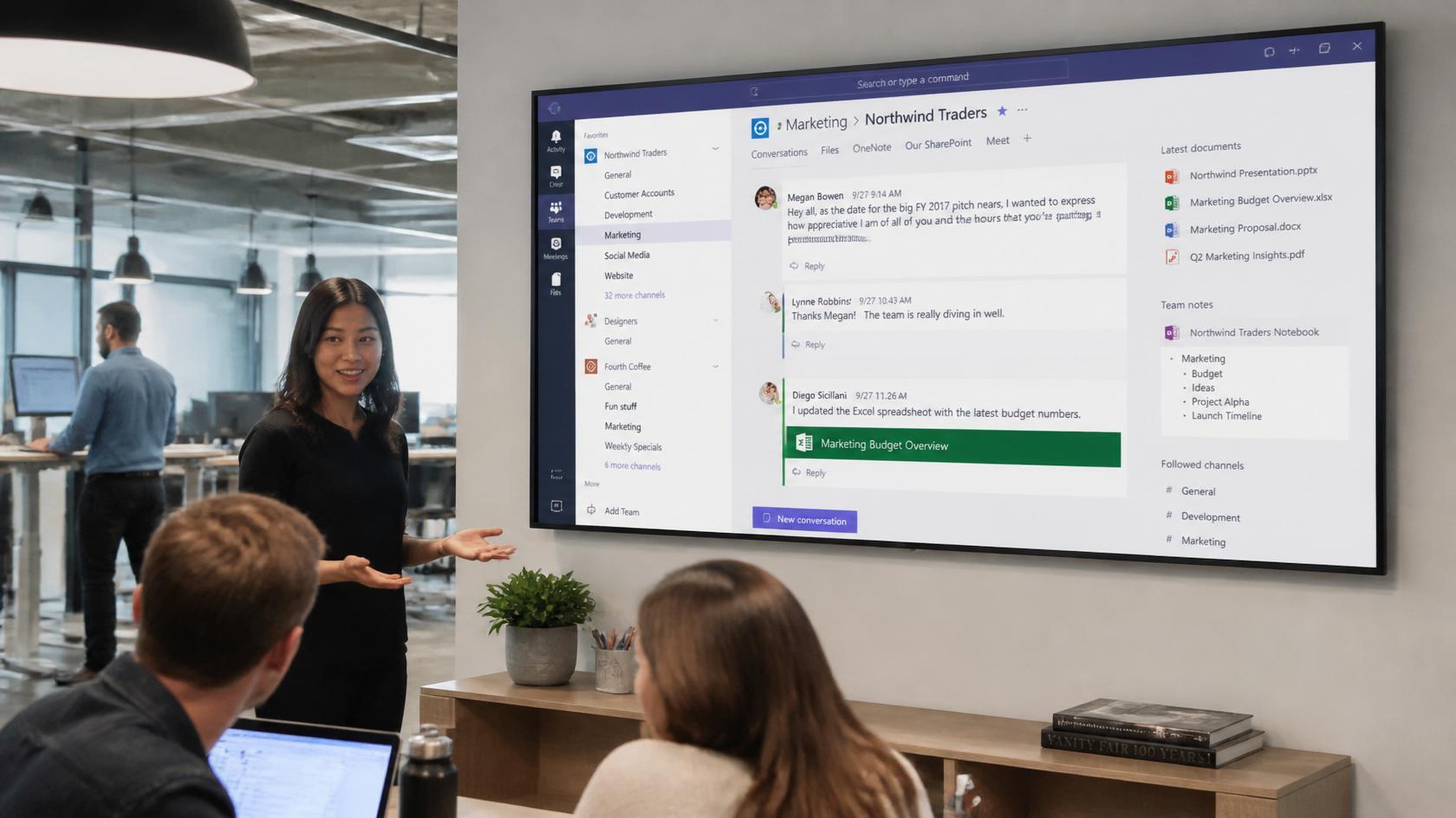
RocketScreens connects Microsoft Teams to TVs and digital displays, turning any office screen into a live communication hub for messages, updates, and announcements from your sales channels.
The platform works on a simple principle. Content refreshes automatically, so Teams posts, alerts, and dashboard updates appear on screens without anyone manually updating a slide deck or refreshing a browser. Once a screen is configured, it stays current on its own.
RocketScreens is built on a secure cloud-based architecture with centralized screen management, which means IT can control what appears on every display from one dashboard, whether that is one screen on a sales floor or dozens of screens across multiple office locations. With 100+ integrations, it acts as the bridge between collaboration happening inside Teams and visible performance across the entire sales floor.
What Sales Teams Can Show on Screens with RocketScreens and Teams
A well-designed sales display typically rotates through a mix of communication and performance content:
- Live Teams messages: Key announcements from sales leadership, daily goals, recognition posts, and closed-won celebrations pulled straight from your sales channels.
- Meeting and call insights: Summaries and action items from Copilot or integrated CRM apps that surface in Teams, broadcast so the whole pod stays informed.
- Sales dashboards: Power BI or Dynamics 365 reports displayed as live charts and KPIs, covering pipeline coverage, forecast vs. quota, win rates, and activity metrics.
- Leaderboards and targets: Google Sheets or Excel scorecards shared through Teams and shown on screens for rep-by-rep performance, call volumes, and daily bookings.
Because RocketScreens supports multiple data sources on the same channel, one screen can rotate between a Teams announcement, a Power BI pipeline dashboard, and a Salesforce report without any manual intervention.
Solving Daily Sales Alignment Challenges with Live Displays
Mapping this back to the alignment problems covered earlier:
- Lack of visibility: Everyone sees pipeline, bookings, and activity metrics all day without opening a CRM or BI tool. The data comes to the team instead of the other way around.
- Data spread across tools: RocketScreens pulls from Microsoft Teams, Power BI, Salesforce, Google Sheets, and other platforms into unified, rotating TV dashboards. The stack stays fragmented behind the scenes, but the view is unified.
- Teams not checking tools daily: Screens in the sales area show critical updates passively. Nobody has to remember to check a channel to catch an important announcement.
- Delayed decisions: Managers and reps spot dips or spikes in real time and adjust outreach, focus accounts, or campaign priorities the same day.
Real Examples of Sales Department Screens
Here is how different areas of a sales organization typically configure their displays:
- Sales floor TV: Rotating slides of Microsoft Teams announcements, a Power BI pipeline dashboard, and a daily bookings leaderboard visible to the entire team.
- SDR pod screen: Live call queue metrics, outreach targets tracked in Google Sheets, and a Teams channel showing wins of the day to keep energy high.
- Executive corner: High-level revenue charts from BI tools, strategic account status from Dynamics 365, and a leadership Teams channel for company-wide updates.
- Hybrid and multi-office setup: RocketScreens players in different offices showing the same Teams-driven sales channel, so distributed teams see identical numbers and announcements at the same time.
Multi-location scalability matters here. A sales organization with offices in three cities can push one configuration to every screen, ensuring a single version of the truth across the company.
How RocketScreens Integrates with Microsoft Teams
Implementation is straightforward and does not require a heavy IT project:
- Step 1: Connect your Microsoft account. Authenticate securely and select the Teams channels or content you want to display.
- Step 2: Add supporting data sources.
- Step 3: Design the rotation. Schedule screen layouts and slide rotations so sales teams see the right mix of messages, KPIs, and recognition throughout the day. Morning screens can emphasize daily targets, while afternoon rotations highlight progress and wins.
- Step 4: Deploy to screens. Roll out via TV players or mini PCs connected to existing displays. Centralized screen management lets IT update content, layouts, and sources remotely without touching individual devices.
Access is permission-based and managed centrally, so only approved dashboards and channels ever appear on a screen. Sensitive CRM views stay private while team-level metrics go public.
Best Practices for Sales TV Dashboards
Teams that get the most value from live sales displays follow a few consistent rules:
- Show fewer metrics, bigger: Three to five KPIs per slide is the practical limit for at-a-glance readability from across a room.
- Mix performance with recognition: Screens that only show numbers feel like surveillance. Screens that mix leaderboards with win announcements and shout-outs build culture.
- Keep data live, not stale: A dashboard showing last week's numbers actively damages trust. Automatic refresh from source systems is non-negotiable.
- Match content to location: SDR pods need activity metrics, closers need pipeline views, and common areas need announcements and celebrations.
- Review the rotation quarterly: As targets and priorities shift, the screens should shift with them.
Common Mistakes to Avoid
- Displaying raw CRM screens: Dense grids designed for desktop use are unreadable on a TV. Use purpose-built dashboard views instead.
- Highlighting only top performers: Leaderboards that celebrate the same two names every day demotivate the rest of the team. Rotate metrics like most improved, most meetings booked, or fastest response time.
- Ignoring data hygiene: A live display amplifies whatever is in your CRM, including bad data. Clean pipeline stages and consistent logging matter more once numbers are public.
- Treating screens as set-and-forget: Content that never changes becomes wallpaper. Fresh announcements and rotating layouts keep attention.
Impact on Sales Teams: Measurable Benefits
Organizations that combine Microsoft Teams with always-visible displays consistently report the same categories of improvement:
- Faster decisions: Real-time visibility into pipeline, activity, and forecast trends helps managers redirect focus quickly instead of waiting for the weekly review.
- More ownership: Reps see their own performance against targets and peers throughout the day, which builds accountability without micromanagement.
- Better communication: Priority messages posted in Teams become visible on screens, reducing missed announcements and repeated questions.
- Fewer missed targets: Continuous awareness of goals and progress keeps the entire team mentally aligned with the numbers that matter.
Frequently Asked Questions
How can Microsoft Teams help a sales department beyond chat and meetings?
Microsoft Teams can act as the operational hub for a sales department when connected to CRM and BI tools. Channels become deal rooms, tabs surface Power BI and Dynamics 365 dashboards, and Copilot generates meeting summaries and action items. Paired with digital signage, those same channels and dashboards become always-visible displays across the sales floor.
What KPIs should we show on our sales TV dashboards?
Start with pipeline coverage against quota, bookings versus target for the current period, daily or weekly activity metrics such as calls and meetings booked, and a team leaderboard. Keep each slide to three to five metrics so the screen stays readable from a distance.
Can we display Power BI or Dynamics 365 Sales dashboards alongside Teams messages on the same screen?
Yes. RocketScreens supports multiple sources in a single screen channel, so one display can rotate between a Teams announcement feed, a Power BI pipeline dashboard, and a Dynamics or Salesforce report. Rotation timing and layout are fully configurable.
Is RocketScreens secure for showing CRM and BI data on office TVs?
RocketScreens uses secure, permission-based authentication and a cloud-based architecture with centralized management. Administrators control exactly which channels, dashboards, and reports each screen can display, so sensitive views stay restricted while approved team metrics go public.
Do remote or hybrid sales teams benefit from TV dashboards as much as in-office teams?
Yes. RocketScreens players can be deployed across multiple offices showing identical Teams-driven channels, so distributed teams see the same numbers and announcements at the same time. Hybrid teams also benefit because the office display reinforces the same data reps see inside Teams when working remotely.
Make Microsoft Teams Truly Visible
Microsoft Teams is already the backbone of sales collaboration in most organizations. Its full value appears only when the data flowing through it is visible all day, to everyone, without requiring anyone to click a tab or open a report.
RocketScreens turns your Microsoft Teams channels, Power BI dashboards, and CRM data into live, visible displays your whole sales team can see, understand, and act on.
Ready to put your sales numbers where your team can see them? Book a demo with RocketScreens, explore the Microsoft Teams integration, or talk to our team about designing a live sales command center for your office.