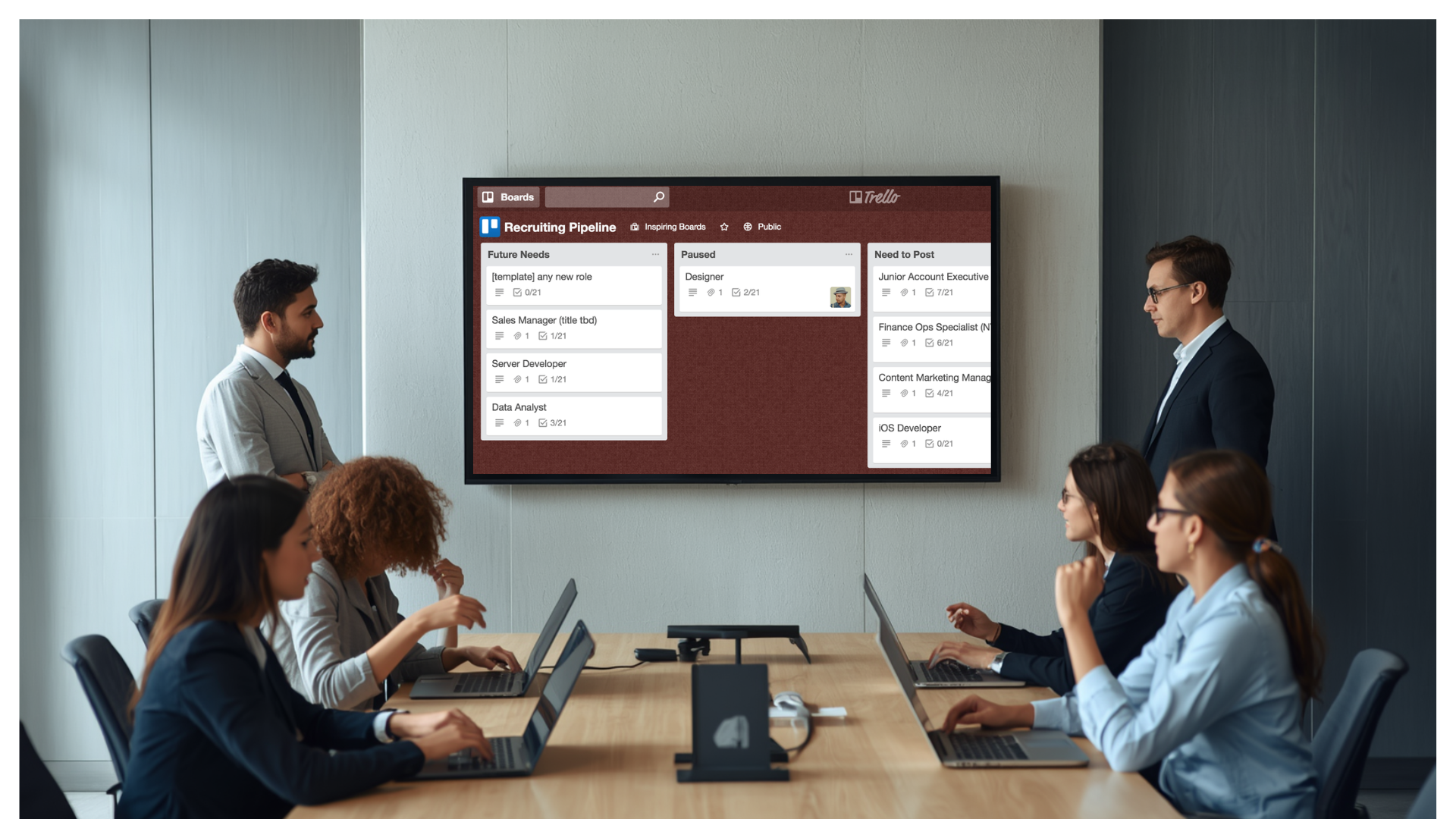
Recruiting pipeline digital signage takes the candidate tracking that HR teams already manage in tools like Trello and projects it onto shared screens across the office. Instead of pipeline status living inside one recruiter's browser tab, stages such as sourcing, screening, interviewing, offer, and hired become visible to hiring managers, department leads, and executives the moment they walk past a hallway display or a conference room screen.
What Is Recruiting Pipeline Digital Signage
Recruiting pipeline digital signage refers to screens, typically mounted in HR offices, recruiting team areas, or leadership spaces, that pull live data from an applicant tracking system or a kanban-style board and present it as a readable, continuously updated dashboard.
The underlying data source is often a tool teams already use for day-to-day candidate management. Many HR departments organize hiring with a board structure where each candidate is represented as a card and each list represents a stage in the process, moving from intake through screening, interviewing, offer, and hire. That structure works well inside a single tool, but it has a limitation: only the people actively logged in can see it.
Digital signage closes that gap. It does not replace the tracking tool. It extends the same data, through an integration or export, onto a screen that anyone in the building can glance at without opening an app or requesting an update.
Why Recruiting Pipeline Visibility Matters for Organizations
Hiring is rarely the responsibility of one person. A typical requisition touches a recruiter, a hiring manager, an interview panel, and at least one executive sponsor who wants to know when a critical role will be filled. When pipeline status is locked inside a single tool, every one of those stakeholders has to ask for an update instead of simply seeing one.
Visible pipeline data changes that dynamic. A hiring manager walking past a screen in the recruiting area can see that three candidates have moved from screening to interviewing without sending a Slack message. A department head can see at a glance whether an open role is stalled in sourcing or already at offer stage.
This kind of ambient visibility reduces the back-and-forth that slows hiring down. It also creates shared accountability. When pipeline stages are displayed for the whole team, ownership of moving candidates forward becomes a visible, shared responsibility rather than something tracked privately.
Business and Operational Impact
The operational case for recruiting pipeline digital signage rests on a few measurable outcomes that HR leaders track closely.
Faster time to fill is the most direct benefit. When stalled candidates are visible on a shared screen rather than buried in a board only recruiters check, bottlenecks get noticed and addressed sooner. A candidate sitting in screening for two weeks longer than expected is far easier to spot on a wall display than in a tool nobody outside HR opens.
Reduced status-update overhead is a second, often underestimated impact. Recruiters spend a meaningful share of their week answering "where do we stand" questions from hiring managers and leadership. A live screen answers that question continuously, freeing recruiter time for sourcing and candidate engagement instead of reporting.
Better cross-team alignment follows naturally. When open roles, application volume, screening counts, interviews completed, and offers extended are visible in one place, leadership conversations about headcount and hiring priorities start from shared facts rather than a recruiter's memory or a stale spreadsheet.
How to Implement Recruiting Pipeline Digital Signage
Rolling out a recruiting pipeline display does not require rebuilding existing HR workflows. It requires connecting what already exists to a screen.
- Identify the source of truth. Most teams already track candidates in a kanban-style board or an applicant tracking system with defined stages such as intake, applied, screening, interviewing, offer, and hired.
- Confirm an integration path. Check whether the tracking tool offers a native connector, an API, or an export format that a signage platform can read on a scheduled refresh.
- Design the layout for a glance, not a deep dive. A wall display is read from a distance and in passing, so it should show stage counts, candidate names where appropriate, and time-in-stage rather than full candidate profiles.
- Set a sensible refresh interval. Hiring data does not need second-by-second updates. A refresh every few minutes keeps the display current without taxing the integration.
- Choose the right physical locations. Recruiting team areas, HR offices, and leadership meeting rooms each benefit from a different level of detail, so the same data can be presented differently depending on the audience.
- Establish a review cadence. Treat the display as a living dashboard that gets revisited as roles open and close, not a one-time setup.
Centralized screen management matters once an organization moves beyond a single display. A multi-location employer with HR teams in several offices needs to push the same pipeline view, or location-specific versions of it, to every screen from one place rather than configuring each display individually.
Industry Use Cases for Recruiting Pipeline Displays
Recruiting pipeline visibility plays out differently depending on the type of organization and how hiring-intensive it is.
- Staffing and recruiting agencies use pipeline displays in shared recruiter bays so the whole team can see candidate flow across multiple client requisitions at once, helping managers spot which roles need extra sourcing support.
- Retail and hospitality chains with high-volume, multi-location hiring use signage in regional offices to track application and screening counts across stores, since seasonal hiring spikes make manual status checks impractical.
- Healthcare systems facing chronic staffing shortages use pipeline screens in administrative offices to keep clinical leadership aware of how nursing and support-staff requisitions are progressing without pulling recruiters into status meetings.
- Manufacturing and logistics employers with continuous frontline hiring needs use floor-adjacent or office displays to show open positions and pipeline stage counts, supporting plant managers who need headcount visibility without HR system access.
- Technology and professional services firms use pipeline screens in talent acquisition team spaces to track engineering or specialized-role pipelines, where time-in-stage data helps identify where candidates are dropping out of process.
Common Challenges in Displaying Recruiting Pipeline Data
Putting candidate data on a shared screen introduces a few challenges that are worth planning for before rollout.
- Candidate privacy and compliance. Full names, contact details, or sensitive screening notes are not appropriate for a hallway display, so data needs to be filtered or anonymized before it reaches the screen.
- Data freshness gaps. If the integration between the tracking tool and the display refreshes too infrequently, the screen can show outdated stage counts, undermining trust in the dashboard.
- Audience mismatch. A display built for recruiters with granular stage detail may overwhelm an executive audience that only needs role-level summaries, and the reverse is also true.
- Tool sprawl across teams. Larger organizations sometimes run hiring through more than one tracking system, which complicates pulling a single, consistent pipeline view onto one screen.
Best Practices for Recruiting Pipeline Digital Signage
- Keep the display stage-focused. Show counts and movement between sourcing, screening, interviewing, offer, and hired rather than trying to replicate the full detail of the underlying tracking tool.
- Match the screen to its audience. A recruiting team room can show more operational detail, while a leadership space should show role-level summaries and headline metrics.
- Anonymize where needed. Use candidate initials, requisition numbers, or role titles instead of full personal details on screens visible to a broad office audience.
- Pair the display with a recurring review. A weekly pipeline review that references the same screen reinforces it as a working tool rather than background decoration.
- Plan for scale from the start. Even a single-office rollout benefits from a centralized management approach, since most organizations eventually add more screens or more locations.
Mistakes to Avoid
- Displaying raw candidate data without filtering for privacy, which creates compliance risk and discomfort among candidates and staff alike.
- Treating the display as a one-time install rather than a living dashboard that needs occasional layout and content adjustments as hiring needs change.
- Overloading the screen with every available metric instead of the handful that actually drive hiring decisions.
- Choosing a signage platform without checking integration support for the specific tracking tool or applicant tracking system already in use.
- Ignoring screen placement, since a display in a low-traffic corner delivers far less value than one in a space the relevant team actually passes through.
Frequently Asked Questions
Can recruiting pipeline data from Trello or a similar tool be displayed on digital signage?
Yes, provided the tool offers an API, native connector, or export that the signage platform can read on a scheduled basis. Many kanban-style boards support this kind of integration, which allows stage and card data to be pulled into a dashboard layout without manual re-entry.
Is it safe to show candidate information on a shared office screen?
It can be, as long as the display is designed with privacy in mind. Most organizations limit shared screens to stage counts, requisition titles, and time-in-stage metrics, reserving full candidate names and notes for screens in more controlled, access-limited spaces.
How often should a recruiting pipeline display refresh?
A refresh every few minutes is sufficient for most hiring workflows. Recruiting data does not change at the pace of, for example, a live sales dashboard, so frequent but not constant updates keep the display accurate without unnecessary system load.
Does this require a dedicated screen for HR, or can it share space with other dashboards?
Either approach works. Some organizations dedicate a screen specifically to HR and recruiting in team areas, while others rotate a recruiting pipeline view alongside other operational dashboards on shared displays, particularly in smaller offices with limited screen real estate.
What is needed to manage recruiting pipeline screens across multiple office locations?
A centralized screen management platform is the practical requirement. It allows one dashboard configuration, or a small set of location-specific variants, to be pushed and updated across every office from a single place rather than maintaining each screen individually.
Recruiting pipeline visibility works best when the data teams already track does not stay locked inside one tool. RocketScreens connects to the applicant tracking systems and project boards HR teams already rely on, manages every screen across every office from one secure, cloud-based dashboard, and keeps pipeline data current without adding work for recruiters. Book a demo to see how a centralized digital signage platform can bring hiring visibility to your offices.